Start Working with Promises in Node.js

Hello Everyone, Today we will create demo on use of promises in nodejs application. As we all know in the current time complex apps are getting created. And to manage complexity within the app one need to use the right tools. Since Nodejs is asynchronous by nature, But the same feature becomes hactic to handle the data flow within the code. Promise is also a very useful library to overcome the complexity of Asynchronous Javascript code. At some places in our code we need the data first then to proceed further so at these situation need of promise comes.
What is a Promise?
The core idea behind promises is that a promise represents the result of an asynchronous operation. A promise is in one of three different states:
- pending - The initial state of a promise.
- fulfilled - The state of a promise representing a successful operation.
- rejected - The state of a promise representing a failed operation.
Once a promise is fulfilled or rejected, it is immutable (i.e. it can never change again).
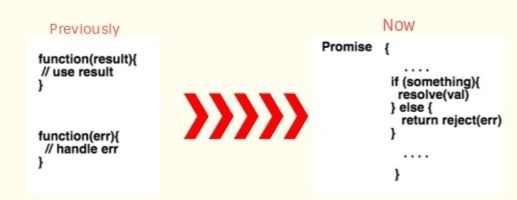
As we can see in the above picture, the basic steps to create promise.
Creating a Promise
var newPromise = new Promise(function(resolve, reject){
   ....
})
newPromise is a Promise type object which allows us to use it for later.
Now we will create a demo of using promises in nodejs application. So here we will use Github REST API to fetch fetch the details about Users, Repositories etc.
Let's have a look over the code
Let's discuss code, At the top we have declared a variable userDetails. Our purpose is to fetch details of a Github user from Github and load that variable. At the top we have create a method initialize within which we have created our promise and after calling github API. Then we are calling resolve method to pass data back to the handler which implements then on the promise.
We have console the data we are getting from promise. Have a look what we will get in console.
Now we have another method at the bottom named fetchData where we get the Promise from above function and attach a function callback in the then function.
{
  "login": "pankajkrr",
  "id": 9263354,
  "node_id": "MDQ6VXNlcjkyNjMzNTQ=",
  "avatar_url": "https://avatars0.githubusercontent.com/u/9263354?v=4",
  "gravatar_id": "",
  "url": "https://api.github.com/users/pankajkrr",
  "html_url": "https://github.com/pankajkrr",
  "followers_url": "https://api.github.com/users/pankajkrr/followers",
  "following_url": "https://api.github.com/users/pankajkrr/following{/other_user}",
  "gists_url": "https://api.github.com/users/pankajkrr/gists{/gist_id}",
  "starred_url": "https://api.github.com/users/pankajkrr/starred{/owner}{/repo}",
  "subscriptions_url": "https://api.github.com/users/pankajkrr/subscriptions",
  "organizations_url": "https://api.github.com/users/pankajkrr/orgs",
  "repos_url": "https://api.github.com/users/pankajkrr/repos",
  "events_url": "https://api.github.com/users/pankajkrr/events{/privacy}",
  "received_events_url": "https://api.github.com/users/pankajkrr/received_events",
  "type": "User",
  "site_admin": false,
  "name": "pankajit",
  "company": null,
  "blog": "",
  "location": "new delhi",
  "email": null,
  "hireable": true,
  "bio": null,
  "public_repos": 3,
  "public_gists": 0,
  "followers": 0,
  "following": 0,
  "created_at": "2014-10-16T07:01:29Z",
  "updated_at": "2018-09-20T11:06:58Z"
}
Pretty cool! Finally, our task completes here.
That’s all for now. Thank you for reading and I hope this post will be very helpful for start using promise in nodejs app.
Let me know your thoughts over the email demo.jsonworld@gmail.com. I would love to hear them and If you like this article, share with your friends.
Find other similar Articles here:
Other Articles
-
 Nodejs Cluster Module | Performance Optimization
-
Cron Job with NodeJS
-
Upload files to server using Node.js ejs template and Multer package
-
File upload using angularjs and nodejs multer module
-
Send email using angularjs and nodejs nodemailer module
-
Nodejs auth app using passport local and ejs template
-
Twitter authentication using nodejs ejs template and mysql
-
Github Authentication using Nodejs
-
Authenticate API Using JWT(Token Based) in NodeJS
-
How to Convert Excel to Json in Nodejs Application
-
Server Side Pagination with Nodejs and MongoDB
-
Login with Facebook in Node.js Express Application
-
Start Creating API in NodeJS with Mongodb Using Express Framework
-
Download remote server files using Node.js
-
Create Restful API with nodejs and mysql database
-
Paypal Integration in Nodejs Application
-
How to Submit Form with Ajax in NodeJS App
-
Twillio Direct Audio call integration with Nodejs Express
-
Implementing Google reCAPTCHA in Node.js Application
-
Angular6 CRUD Application with NodeJS and Mongodb
-
How to Resize Image in NodeJS
-
How to Implement Memcached in Nodejs Application
-
Login with Google in Node.js Application
-
Login with LinkedIn in NodeJS Application
-
Angular7 CRUD with nodejs and mysql example
-
Amazon Cognito User Pools In Node.js Application
-
Payment With Stripe in Node.js Application Example & Tutorial
-
Caching with Redis in Node.js Application
-
Start Working with Voice Driven Application with Nodejs
-
How to upload base 64 image in Nodejs Application
-
Start Creating APIs in Node.js with Async/Await
-
Video Streaming with Node.js
-
Integrate CardConnect Payment with Node.js
-
How to connect Nodejs with PostgreSQL
-
Uploading file with React.js and Node.js
-
Testing NodeJS API with Mocha and Chai
-
Create Basic Nodejs Express App using Jade Template
-
User Authentication In Node.js Application
-
Node.js Event Loop Explained
-
Most Popular Node.js Frameworks
-
5 Most Popular Hacking Tools
-
Best Practices for NodeJs App Developer
-
Best Sites Built With Node.js
-
How To Zip And Download Files In Nodejs
-
How To Merge PDF Files In Node.js Application
-
How To Send Email Using SendGrid In Node.js Application
-
How To List All The Globally Installed NPM Packages
-
How To Enable Cors In Node.js Express
-
How To Download File From Node.js Server
-
How To Convert Text To Speech In node.js
-
Serve Static Files In Node.js
-
How To Optimize Performance With GZIP Compression
-
How To Handle Cookies In Node.js Express App
-
Enable HTTPS in Node.js Express Application
-
Update Package Version in Package.json
-
Nodejs vs Golang
-
How to Setup a Simple HTTP Server/ Local Web Server with NodeJS
-
What is Deno? How it is different from Node.js?
-
Most Useful NodeJS Libraries a Nodejs Developer Should Know
-
Read and Write Data to Local JSON File with NodeJS
-
How to secure NodeJS REST API from Attacks
-
How to Delete Files in Node JS
-
What is NPM?
-
Explain Callback Function in NodeJS
-
Most Common AWS Services a NodeJS Developer Should Know
-
How to Prevent SQL Injection in a NodeJS API